Rate
How fast the notes go: 1/4, 1/8, 1/16 or 1/32 notes.
Always in sync with your DAW tempo. While your DAW plays, PIP locks to the timeline (bars and beats).
MIDI arpeggiator
Hold a chord. PIP plays it.
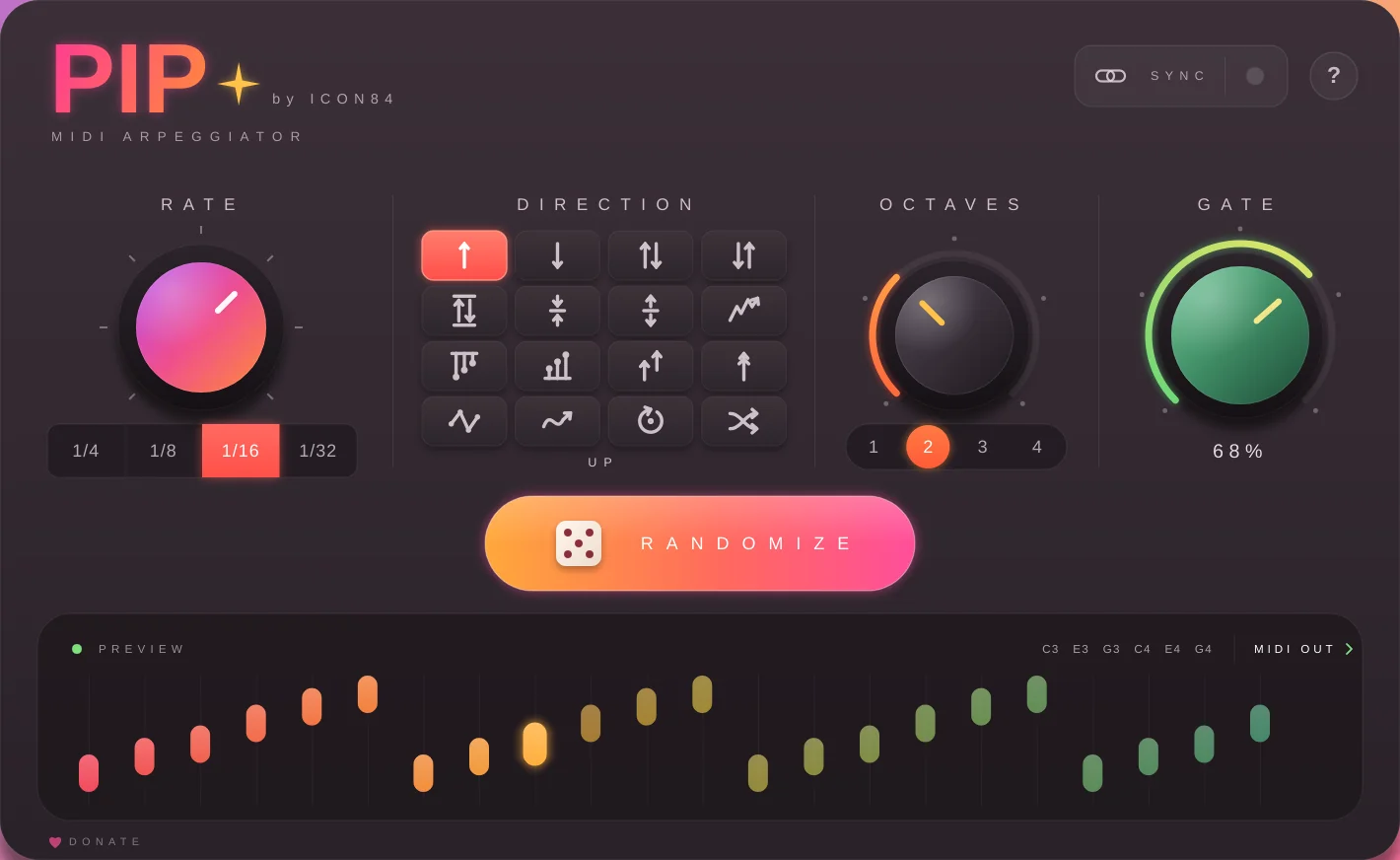
Hold a chord, and PIP plays its notes one after another, in time with your DAW. 16 directions, four rates, up to four octaves and a gate from short and plucky to long and connected.
♪PIP sends MIDI, not audio. Put a synth after it (Serum, Vital or any other instrument) to hear the result.
Download VST3 · 3 MBv1.0 · Windows 64-bit · free, always · Try it here ↓ · Setup
Try it in your browser
A web version of PIP with a little synth after it. Pick a chord, press play and try the directions, rate, octaves and gate. Hit randomize when you're out of ideas.
Click keys to hold or release them, like a latch. The bright bar in the preview is the note that's playing.
The controls
How fast the notes go: 1/4, 1/8, 1/16 or 1/32 notes.
Always in sync with your DAW tempo. While your DAW plays, PIP locks to the timeline (bars and beats).
The order of the notes, in 16 patterns: from Up and Down to Converge, Pinky, Random Walk and Shuffle. Hover a button in the plug-in to see its name.
Repeats the chord 1, 2, 3 or 4 octaves higher.
With 2 octaves: C3 E3 G3 C4 E4 G4.
How long each note sounds, 0 to 100%. Left is short and plucky, right is long and connected (legato).
Even at 0% notes are at least 3 ms, so your synth still hears them.
Rolls a new combination of rate, direction, octaves and gate. It stays musical: 1/8 and 1/16 come up most, and gate stays between 30% and 95%.
The preview shows the notes PIP plays, with the current one lit. With no keys held it shows an example on C3–E3–G3.
The sync light turns green while your DAW plays. Stopped? PIP still plays at your project tempo.
16 directions
Examples on a C – E – G chord. Click one to hear it in the demo above.
Setup in your DAW
PIP loads as an instrument that makes no sound and sends MIDI, so it works in every DAW.
Put PIP and your synth in the same chain, with PIP first, and play on that track.
MIDI From → 1-MIDI / PIP and Monitor → In.PIP.vst3 folder to:C:\Program Files\Common Files\VST3Good to know
Troubleshooting
PIP itself makes no sound. Check that a synth comes after it (Reaper and others) or that the synth track listens to PIP with Monitor set to In (Ableton).
Check that PIP.vst3 is in C:\Program Files\Common Files\VST3 and rescan your plug-ins.
The synth is getting MIDI from your keyboard directly instead of from PIP. In Ableton, set MIDI From on the synth track to the PIP track.
While your DAW is playing, PIP waits for the next step on the grid so it stays in time. A note played just after the beat starts right away.
Hold a chord. PIP plays it.
Download VST3 · freeReviews